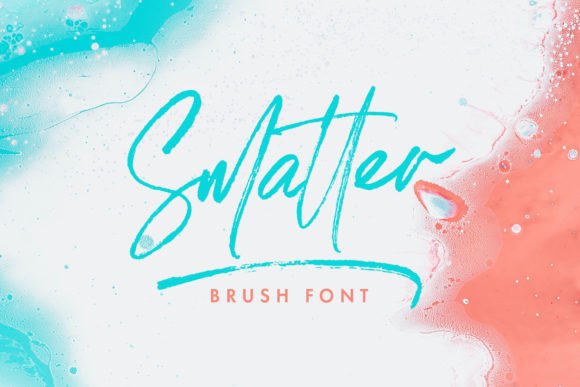
Smatter: A Script Typeface for Web Design
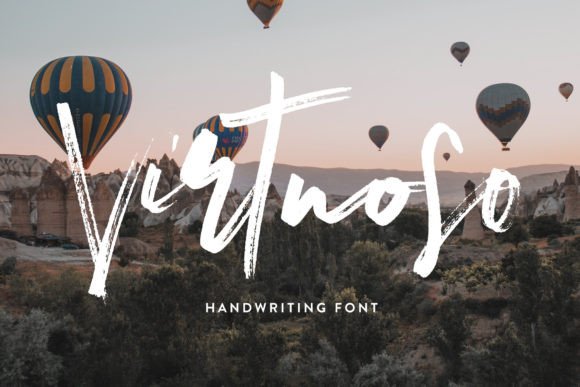
As a web designer, finding the right font can make all the difference in how a site feels and functions. Smatter is a hand-crafted brush script that brings a dynamic energy to digital design while maintaining clarity and readability. It’s more than just a typeface—it’s a tool for creating visual rhythm, brand personality, and engaging user experiences.
Smatter’s character set includes a wide range of ligatures, alternates, and swashes, making it highly customizable for different design contexts. Whether you're working on a creative portfolio, an online store, or a SaaS landing page, this font offers flexibility without sacrificing style. Its organic flow and subtle variations give it a personal, handwritten feel that stands out in a sea of generic fonts.
Using Smatter in Web Design
One of the strongest use cases for Smatter is in headers and hero sections. Its bold, flowing strokes add a sense of movement and emotion that can elevate a website’s visual identity. For example, a coaching website might use Smatter for its main headline to convey warmth and approachability. Similarly, a boutique online store could use it for product titles or promotional banners to create a unique, inviting atmosphere.
Smatter also works well in call-to-action buttons, especially when paired with a clean sans serif font. The contrast between the script’s fluidity and the simplicity of a modern sans serif helps guide the user’s eye and reinforce key messages. This pairing is ideal for landing pages, course sales pages, or subscription sign-up forms where clarity and impact are essential.
For smaller text elements like logos, decorative accents, or short phrases, Smatter adds a touch of elegance and creativity. It’s perfect for branding projects where a personal, artisanal feel is desired. However, it’s important to consider legibility when using it in longer blocks of text. While Smatter is readable at larger sizes, it may not be the best choice for body copy due to its intricate details and varying stroke widths.
Designing for Readability and Visual Hierarchy
When using Smatter in web layouts, it’s crucial to maintain a clear visual hierarchy. Use it for headings, subheadings, and key phrases rather than long paragraphs. This ensures that the font enhances the design without compromising usability. On mobile screens, where space is limited, Smatter can still shine as a header or title, provided it’s scaled appropriately.
On dark backgrounds or image overlays, Smatter retains its legibility thanks to its strong contrast and consistent stroke weight. For light backgrounds, consider adjusting the font size or spacing to prevent it from appearing too thin or washed out. In responsive layouts, ensure that the font scales smoothly across different screen sizes to maintain a cohesive look.
Pairing Smatter with Other Fonts
Font pairing is an essential part of web design, and Smatter pairs well with both serif and sans serif fonts. For a modern, professional look, pair it with a clean sans serif like Inter or Roboto. This combination works well for SaaS websites, editorial content, or corporate branding where clarity and sophistication are key.
If you’re going for a more traditional or editorial feel, consider pairing Smatter with a serif font like Playfair Display or Georgia. This creates a balanced, timeless aesthetic that’s ideal for blogs, magazine-style sites, or content-heavy platforms. The contrast between the script’s fluidity and the serif’s structure adds depth and visual interest.
For a more casual or creative vibe, try combining Smatter with a handwritten or decorative font. This can be effective for personal branding, social media graphics, or niche online stores that want to emphasize individuality and craftsmanship.
Practical Considerations for Web Use
Before implementing Smatter in a project, check the available styles, file formats, and webfont licensing options. Many premium fonts come with different weights and variants that can expand your design possibilities. Ensure that the font supports the languages and characters needed for your target audience.
Commercial font licensing is another important consideration. If you’re using Smatter for client projects, online stores, or digital templates, confirm that the license covers these use cases. Some fonts require separate licenses for web embedding, which can affect your workflow and budget.
Ultimately, Smatter is a versatile and expressive typeface that can enhance a wide range of digital projects. Whether you're designing a creative portfolio, a branded web experience, or a high-converting landing page, this font offers the tools to create something truly unique. Its blend of artistry and functionality makes it a valuable addition to any designer’s toolkit.
By thoughtfully integrating Smatter into your designs, you can create a stronger brand identity, improve user engagement, and deliver a more memorable digital experience. Its personality and flexibility make it a standout choice for anyone looking to bring a human touch to their web projects.